




- Conversion to SWOP
- New Prepress Manager
- Design Names
- Double Sided Banners
- Lois Lite v1 Beta
- New Lois Functionality
- New Sales Tool
- PosterFlex™ Video
News Flash: To Vendor Feature - Circle Graphics
Full Details on the function and procedure.
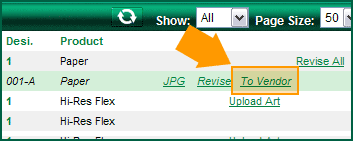 Lamar Graphics has implemented the “To Vendor” function in the CAP Grid for Paper and PosterFlex to be ordered from Circle Graphics. Just click the “To Vendor” link next to the version you want Circle to produce. Clicking the link takes you to the next screen that will give you the order details of that order so you can verify what design and version you will be ordering. Select “Circle” from the vendor drop down list and click the “Send to Vendor” button.
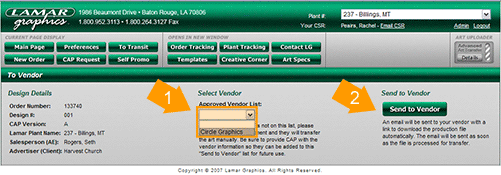
You and the vendor will receive an email confirming that the art file has been processed and will be ready to download in a few minutes. Each vendor in the system will be supplied with their own FTP folder that will house all of their files for a set number of days. The vendor can then download the production files at their leisure.
This is the beta version of this feature and it needs to be tested for errors. Give a hand and use this feature to send your files to Circle Graphics. Once thoroughly tested several additional vendors will be added to the list to increase it's functionality.
Why this feature is important...
Previously you had to provide the CAP ID# when placing your production order with Circle Graphics. Circle would then compose a list of CAP files to request twice a day at 11:00am and 3:00pm. This process is not very fast, was prone to human error and caused some problems with our records and archiving procedures.
Now in addition to providing the CAP ID# to Circle with your production orders, you must first activate the “To Vendor / Circle” function to send them the art file. This is an extra step from the previous process but it provides several advantages.
First, once the “To Vendor” option is clicked, the files are prepared and ready for the vendor to download in just minutes. The second advantage is we will now have an accurate record of when, what version, and who ordered each job not being printed at LG. The job can be phased as “closed” and the proper file will automatically be scheduled for archiving. This should help some issues in our current archiving system where the wrong versions of the art were being stored. Lastly this process is completely automated so it does not have to be used during regular business hours. The files can be prepared for Circle to download at anytime, day or night. This will help with the last minute, after hour emergencies that happen from time to time. Rush orders can also be made available in just minutes without a single phone call or email to LG.
Ideally you would go through the CAP Grid on LG before you call Circle with your order. You can click the “To Vendor” link to move the file while you are making your list of final designs and versions to order from Circle. Then you pick up the phone to place your order with the vendor, and the files will be ready for download by the time you hang up the phone or complete the order form online.
This is the first phase of the “To Vendor” feature. Once the system is fully tested other commonly used vendors will be added to the list. You will no longer need to call or email LG to File Swap production files to outside vendors. The process is be fully automated and can be used to transfer files day or night, week day or weekend.
This is the list of vendors that are to be added to this feature:
• Quality Offset Printers
• Mammoth Media
• Prisma Flex
• Haugen Advertising and Graphics
If you have a vendor you’d like to add to this feature, please contact Mark Rankin for consideration.
This is just another step in on going process to improve our system and add function and efficiency to the production side of our business. Thank you for your time and support.
The Lamar Graphics Staff
Known Issues in the Beta Release
1. Some jobs will cause a server time out error. This is due to extremely large files taking too long to transfer to the processing site. Some layered Circle Graphics files can reach over 200mb before processed for download. This small percentage of jobs is typically what triggers this error. Data is still being collected to discover the breaking point.
Please report all errors to the CAP Coordinator (capcoordinator@lamargraphics.com) via phone or email. Please include a Job ID# to expedite the process.


|