Although we can process native InDesign files, converting your documents to PDF
format before submission can eliminate many common problems that can delay your
order. These problems include missing fonts, mismatching color modes and more.
All images and logos have to be in the same color space to
correctly export to prevent automatic color conversions with disastrous results.
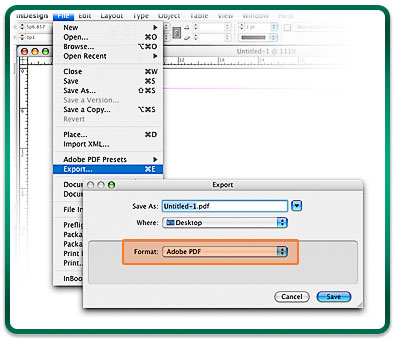
1. From InDesign, choose File > Export and select Adobe
PDF in the
format field.

2. In the Export To PDF dialog box, select High Quality Print as
the Adobe PDF Preset.
Then select General from the options on the left and check the Create Tagged
PDF option.
Finish by clicking EXPORT.
When directly Exporting to PDF from InDesign, the PDF format has a maximum document size of
48 inches. If your document size is larger than 48 inches in height or width, there is an
alternative way to create a press ready PDF. This is done by "printing to file"
as an Adobe PostScript file, and then converting it to a PDF in Acrobat Distiller. Click the header
above to expand a step by step guide to this process.
All images and logos have to be in the same color space
to correctly export to prevent automatic color conversions with disastrous results.
Part 1: Saving an InDesign document as a PostScript file.

1. Open the document in InDesign, and choose File > Print.
Choose PostScript® File from the Printer menu.
Choose Device Independent from the PPD menu.
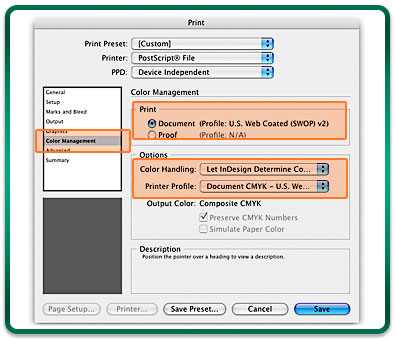
2. Next choose Color Management. Make sure the Document
and Printer profile are the same. For Color Handling, select "Let InDesign Determine Colors".
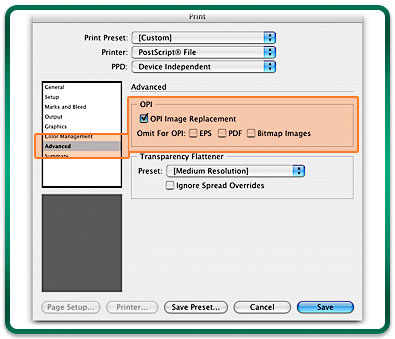
3. In Advanced, check the "OPI Image Replacement"
option to insure
all link files are embedded correctly.
Enter a name in the File Name box, and click Save to create the .ps file.
Part 2: Converting a PostScript file to PDF in
Adobe Distiller.

1. Start Acrobat Distiller, and choose "High Quality
Print" from the Adobe PDF settings/Default Settings pop-up menu (Distiller 6.0-8.0) or the
Job Options pop-up menu (Distiller 5.x).
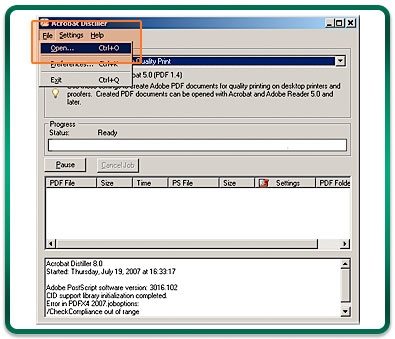
2. Choose File > Open, and navigate to the PostScript file
and click Open.
A PDF will be created and saved in the same location as the .ps file.
Lamar Graphics can process the .ps file created in Part 1 for you if
you do not have Adobe Distiller. We encourage the use of Adobe Distiller as it compresses the
file and shortens upload time. A compression program like Win Zip or Stuffit should be utilized
when Distiller is not available.
*This method works for Quark and Indesign



 InDesign CS2: Export to PDF


